Here is everything you need to do for a hot shower in your Family Finca:
- For hot water, the water heater must be turned on. For this we need gas.
- Open the gas bottle.
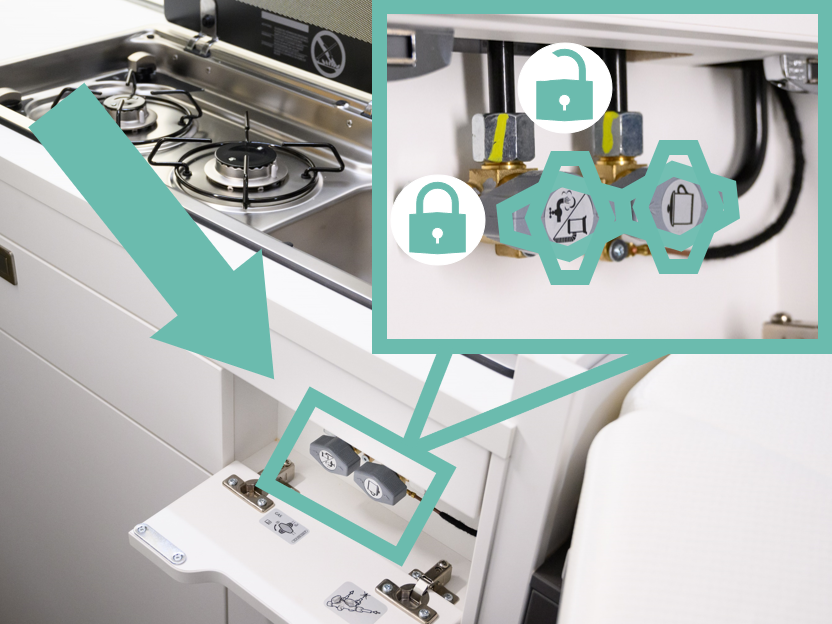
- Then additionally turn on the safety lever for hot water (faucet + heating symbol). This is located behind the white flap under the sink:
- Check via the control display whether you have enough fresh water in the water tank. For a thorough shower, we recommend a fill level of 50%:
- The boiler must be filled with water. To do this, let the water run briefly and turn the tap to hot.
- Now switch on the hot water on the camper display. This differs depending on which display you have:
Switch on via "On/Off".
Select "Heating & Ventilation", then heating for the living area. Then switch on the hot water operation using the slider:
Energy source:
- If you are freestanding (without external power supply), select "Gas".
- When connected to shore power, you can also select "MIX 6A" or "MIX 10A". The boiler will then be powered by a mix of gas and electricity.
- It takes about 20 minutes for the water to heat up.
- For showering, fold up the sink and pull out the shower hose of the indoor shower, then place it in the holder above the mirror. After showering, gently push the hose back in.
Watch it in the video:
Outdoor shower
The outside shower is located at the rear left of the luggage compartment. To switch it on, plug in the shower hose and press the small switch. You can regulate the temperature with the wheel next to the switch.
Troubleshooting
The outdoor shower drips at the connection if the hose is not connected:
- Check whether the water pump switch of the outdoor shower has been accidentally activated.
- For the gold-colored connections of the outdoor shower, check whether the hose coupling is really closed after disconnecting the hose:
Open (you can see the small holes):
Closed (no holes visible):
If the hose coupling is open, push the golden ring backwards (as if you were detaching the shower hose from the coupling) and the coupling should close again. You can also carefully insert a key or a pen in the hole and wiggle a bit to loosen the rings.
The water does not warm up
-
Check whether gas is flowing in general. If there is no gas flow, see the section on
"How to check the gas flow" in this article: Parking heater - Family Finca (VW Grand California)
- If you forgot to open the gas bottle or the stopcock before switching hot water on via the on-board display, this error must be deleted on the Truma control unit. You will find this under the rear seat:
Common errors on the Truma display:
E517H // E507H // E516H: The error code appears when the gas supply is interrupted. Turn off the system, turn on the gas, press the black button to confirm that the error has been acknowledged. You may need to reset the appliance and start the process again.
W412H: The error appears when a window is open. This activates the safety pin to prevent exhaust gases from the heater entering the vehicle interior. To allow the exhaust gases to flow again, close the window.
W418H // W411H // W303H // E654H // E566H: The error code appears if the voltage of the camping battery is insufficient.
Check the battery capacity on your on-board display. If the value is below 12.3 V (50%), the battery must be charged before starting the heater.
Repeated unsuccessful restarts of the Truma unit can cause the heater to block.
If another error code is displayed, please contact us so that we can help you further.
Reset:
You found the cause of the error and fixed it? Great! Some errors disappear by themselves.
Others need to be confirmed by navigating to the black button to the exclamation mark (by turning the black button):
Now press the black button to confirm the error. The symbol should now disappear and the heater can be put back into operation using the familiar steps.
Resetting the Truma unit after an error/warning message. Only ONCE!!!
In some cases, it helps to manually reset the Truma. Try this only once – if you repeatedly reset it without eliminating the cause, the entire system can be permanently disabled.
Operating the boiler via the Truma unit:
To be on the safe side, here are the instructions on how you would turn on hot water completely via the Truma display:
- To activate the screen, press the black button briefly.
- Turn the black button clockwise until you see the symbol with a thermometer under water blinking:
- Click on the black button to confirm.
- The text "OFF" will appear. Turn the wheel clockwise to select select the mode: ECO (40℃), HOT (60℃) or BOOST.
- Once you find the desired mode, press the button to select.
- The main menu will appear again and the boiler should be working.
- Wait about 20 minutes until the water in the boiler is hot.