To ensure that all 12V electronic devices work without external power, the camping battery voltage should never fall below 12V (50%).
The lighting in the Camper Castle (LMC Tourer Lift) only works if the camper battery is sufficiently charged or if the camper is connected to an external power supply.
Camper Castle LMC (Fiat/Citroen)
To switch on the lighting, you must first switch on the power circuit via the on-board computer, which is located above the side door. To do this, press the black rotary knob.
Camper Castle LMC (Ford)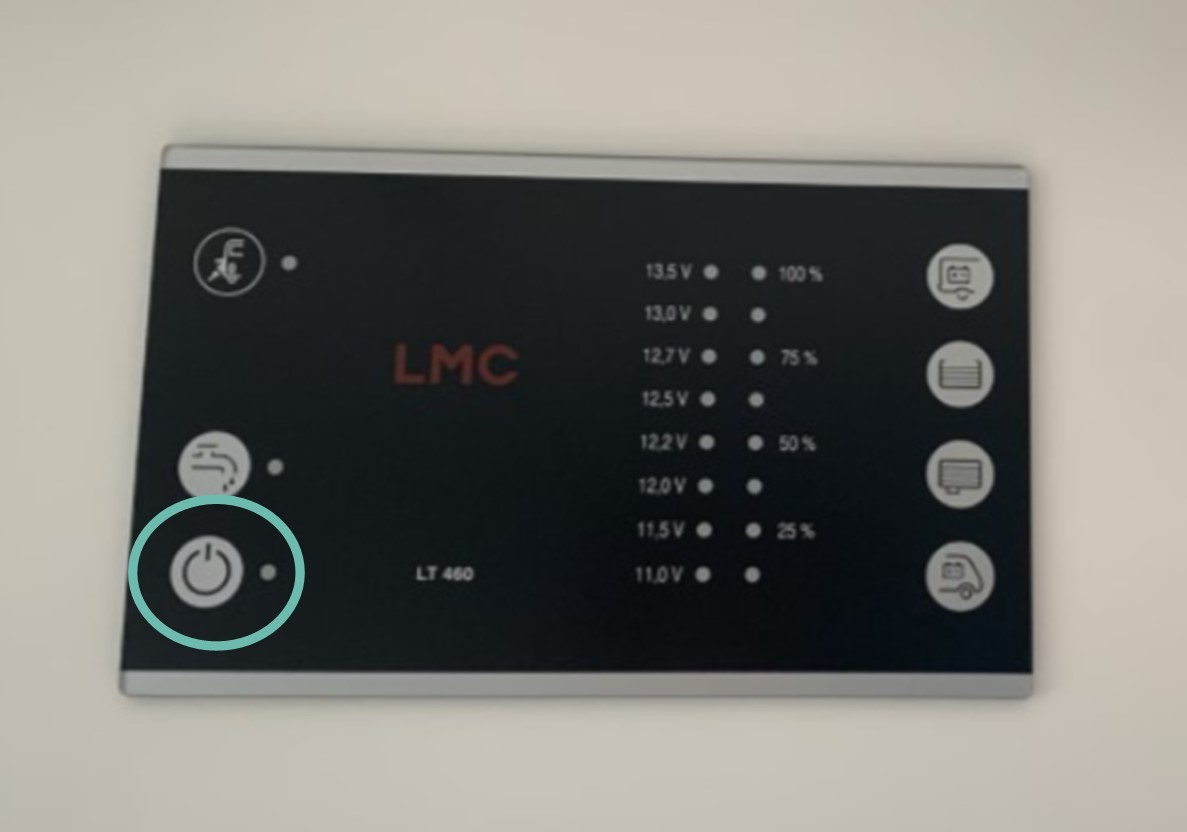
- There are four light switches on the wall between the bed and the bathroom.
- Light strips above and below the wall elements (above the bed).
- Light points on the floor.
- Light on the ceiling window above the bed.
-
Light strips on the wall behind the bed.
- There are three light switches in the entrance area:
- Light points on the ceiling
- Awning light
- Light strips under and above the wall units
-
The light strips above the bed, in the dining area and on the bunk bed can be switched on and off using the toggle switch on the side.
There are numerous sockets and USB ports throughout the vehicle:
-
Two 230V sockets and two USB ports (1A and 2.1A) are located next to the door in the living area.
-
A further 230V socket is located under the dining table.
-
There are two 230V sockets on the kitchen unit.
-
There are also two 230V sockets above the kitchen.
-
There is also a 230V socket in the bathroom.
Please note the following:
- When stationary, do not charge any device in the driver's cab via USB. The starter battery will discharge and the engine may not start!
- 230V sockets: only work with an external power connection
- USB ports and 12V sockets: work without an external power connection, with a charged camping battery (always keep it above 50% or 12V).
- With a full battery, you can be self-sufficient for 1-2 days without a power connection, depending on usage. Then you need to drive for a while to recharge the battery or connect your camper to an external power source.
- 🚗 Slow driving & short distances → hardly any battery charge
- 🛣️ Long drives on motorways → better charge, but takes several hours
- 🔋 The starter battery is charged first, then the camping battery.
- ⚠️ Driving alone is often not enough to fully charge the camping battery.
- 🔌 Recommendation: charge externally every 48 hours to avoid energy shortages (especially at night 💤).
- Don't forget to unplug the power cable before driving off! For some models, you need to press the blue lever next to the plug downwards.
Troubleshooting
Camper Castle LMC (Fiat/Citroen)
If the on-board unit cannot be switched on, you can restart it. To do this, press the black rotary knob for 20-30 seconds until the "on/off" light comes on.
Watch this short video:
If you have problems with the power in the living area, please check:
- Whether the on-board computer is switched on.
- Whether the camping battery is charged.
-
Check the large, red main fuse (50A) under the passenger seat. Also check the other fuses:
Before any fuse is pulled, following safety measures is required:
- Turn off the engine and remove the key from the contact.
- Unplug the car from any external power supply.
- Pull carefully on the fuse by pulling from the sides.
- A damaged fuse can be burnt or have the connector broken (see picture). If so, please replace it. You can find them at petrol stations and hardware stores.
If some of the lights do not turn on please check:
-
If the levers at the blue box under the rear bed are switched on as indicated by the lines next to them:
When connected to an external power supply
The 230V sockets will only work if you are connected to an external power source. Please always check:
- Whether the cable at the campsite and in the camper is plugged in correctly.
- Whether the indicator of the on-board unit is lit, indicating that an external power source is connected.
-
Whether the RCDs under the wooden board under the bed are pointing upwards:
- If everything is OK, check whether the cable or the socket at the other end (which is plugged in at the campsite) is faulty! Maybe a nice fellow camper will let you check with his cable and working socket? :)
Camper Castle LMC (Ford)
If you have problems with the power in the living area, please check:
- Whether the on-board computer is switched on.
- Whether the camping battery is charged.
- Check the large, red main fuse (50A) under the rear seat. Also check the other fuses:
Before any fuse is pulled, following safety measures is required:
- Turn off the engine and remove the key from the contact.
- Unplug the car from any external power supply.
- Pull carefully on the fuse by pulling from the sides.
- A damaged fuse can be burnt or have the connector broken (see picture). If so, please replace it. You can find them at petrol stations and hardware stores.
When connected to an external power supply
The 230V sockets will only work if you are connected to an external power source. Please always check:
- Whether the cable at the campsite and in the camper is plugged in correctly.
- Whether the indicator of the on-board unit is lit, indicating that an external power source is connected.
- Whether the RCDs under the wooden board under the bed are pointing upwards:
- If everything is OK, check whether the cable or the socket at the other end (which is plugged in at the campsite) is faulty! Maybe a nice fellow camper will let you check with his cable and working socket? :)