The Surfer Suite is equipped with a built in fridge (40L).
To turn it on go to the Camper Unit, above the rear view mirror:
- Turn on the camping unit
- Twist the black button once to access the second page of the menu
- The first symbol you will see is a snow flake "Refrig.box". Press it:
- The refrigerator box menu will appear:
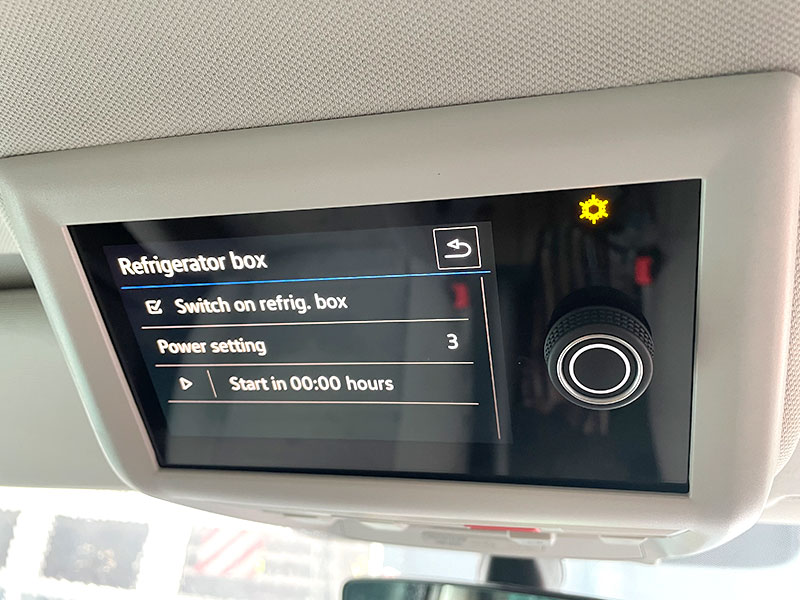
- Select the tick box "Switch on refrig.box". The snow flake lamp on the side will light up to indicate the fridge is on
- Select how cool you want it to be inside the fridge. We recommend level 3.
- You can also program a timer to have it start from a certain point in time
See a short introduction in this video snippet:
Be a little patient 🥰
Please be aware that it may take a few hours until the fridge is fully cooled down! The warmer the environment is and the more food you put in, the longer it may take.
You can speed up the cooling process by:
- putting food in, that already comes from a fridge
- adding cool-packs/ice-packs
Troubleshooting
If the fridge is not cooling down enough, check if you have enough camping battery. Make sure that the fridge is not overfilled, otherwise it won't be able to lower the temperature correctly.
If the fridge door is not closing properly, make sure the closing pin is not jammed.